Simple Video Editing Tips from a KCM Member

Simple Video Editing Tips from a KCM Member
In this video, I provide some tips and tricks on how to shoot effective videos with your phone.
Where do you go from here?
I sat down with KCM Member, Tamara Inzunza who’s really crushing her video marketing game right now to pick her brain on the process she uses to make and edit her videos. A quality video doesn’t need to go through some huge production in order for it to be effective.
Tamara breaks it down into three different approaches you can take based off of your preference, video style, and budget.
Record and Edit Directly From Your Phone
Tamara’s biggest piece of advice is not to get overwhelmed and go out and buy a bunch of fancy equipment. She records all of her videos on her Apple iPhone 11 Pro.
She did her research in different Facebook groups about which phone is best to record video, and this one was highly recommended time and time again. If you’re due for a phone upgrade and video is a priority for your marketing goals, take a look at that phone in particular.
It does happen, but it’s rare to shoot a video in just one take. We’re all human and mistakes are going to happen. If your video requires any editing, you can easily edit right from your phone using iMovie. Just open up the App Store on your phone and download the free version.
One of Tamara’s favorite video editing apps is Over. This free app will not only allow you to edit your videos, but it will also help you create eye-popping Instagram stories and customize your videos with colors, captions, graphics, and fonts that will grab the attention of your buyers and sellers.
These apps are great if you’re looking to build your brand on social media. It’s important to note, if you want to keep it super simple, you don’t necessarily need any of these apps to edit video. Once you record the video on your phone, you have the option to edit where you can cut clips before you post.
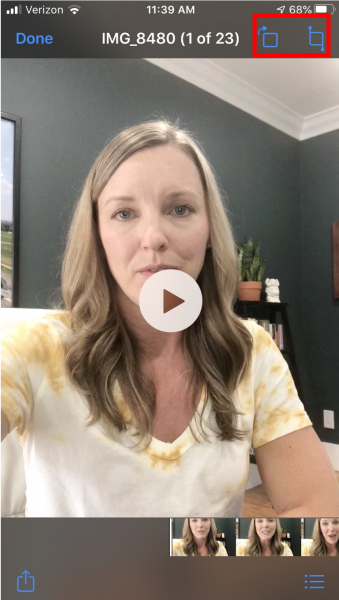 And you might not need to edit your video at all. You can always do a second or third take, just don’t over-critique yourself or you’ll never hit post!
All of the options above are great if your plan is to share this video to social media via Instagram or Facebook feed/story where you want it to be short, sweet, and relatable.
Record on Your Phone/Laptop and Edit on Your Computer
If you want a more well-polished video, you can take it one step further and record on your phone or your laptop and edit on your computer.
The option to record on your laptop is ideal if you have slides or visuals you’d like to share in your video. This works really well if you highlight slides from your Monthly Market Report. You can use a platform like Zoom and set up a meeting with yourself to record you on video as you talk through those slides.
You can sign up for the free version that allows you to set up a meeting for a max of 40 minutes, which is more than enough time to shoot a video.
Once you’re ready to edit, Tamara suggests a couple of software programs you can use.
The first is Filmora, which offers a free download option and they market themselves as the “best video editor for beginners.”
Pros
– Excellent value for money
– Simple to use
– A wide array of features
– Great for both beginners and professionals
– Uploads directly to YouTube and Vimeo
Cons
– Recurring subscription required to use effects store
Tamara uses Movavi Video Suite to create and edit her videos. It’s a simple program that has all the necessary features of a screen recorder wrapped in an intuitive interface. Record screen, webcam, and audio; take screenshots, and share the result via social networks. You can download this screen recorder for free and use almost all of its powerful tools.
Pros
– Allows you to record webcam
– Saves video in multiple formats, including GIF
– Has a scheduled recording feature
– Can highlight the cursor during the recording
– Extremely easy to use
Cons
– The free version has a number of restrictions, such as no system sound recording, no screenshot editing, and a trial watermark added to output videos.
There are different versions you can purchase for $200 or less.
If you do end up editing your own videos, Tamara assures us there is a surplus of information out there on YouTube to quickly become familiar with the process.
Another helpful tip from Tamara is to ask for feedback and suggestions from others. That can be from your spouse, friends, Facebook Groups, etc. It can be hard to put yourself out there at first, but this is how you will grow and learn and start to improve your video marketing.
Record On Phone/Laptop and Edit Through a Third Party
If video editing isn’t your thing, record it and send it off to Fiverr and let them take care of it for you! Fiverr is an online marketplace for digital freelancing services.
Tamara claims they have a fast turnaround time, anywhere from 24 hours up to a few business days and will charge you roughly $25-$50, depending on what you ask for.
Pros
– Website is easy to navigate
– It’s possible to find and hire a freelancer within minutes
– Prices are set upfront so you have no surprises
– Payment is only released to the freelancer after you have approved the work
Cons
– Service fee is higher than competitors like Upwork and Freelancer.com, which charge only 3%
– It can be limiting if the task could change over time
Watch Tamara’s interview here where she discusses her full video editing process:
Bottom Line
If you’re brand new to video remember, you don’t need to be tech savvy or have a background in video production and editing to produce effective video.
Utilize the resources at your fingertips and if you’re going to invest in one piece of equipment, upgrade your phone so you shoot and edit straight from there.
You just have to show up, press record, and then ask for feedback and suggestions that you can then implement to take your videos to the next level. Check out some of Tamara’s tips on how she uses the KCM Connect Facebook Group as a resource to improve her video production.
We’re happy to answer any specific questions you have about video editing. We can’t claim to be experts, but our team is happy to help as much as we can.
Just reach out to us at support@keepingcurrentmatters.com if we can help!
And if you want to pick Tamara’s video brain, you can find her at

|
Members: Sign in now to set up your Personalized Posts & start sharing today!
Not a Member Yet? Click Here to learn more about KCM’s newest feature, Personalized Posts. |